BuilderVue AI

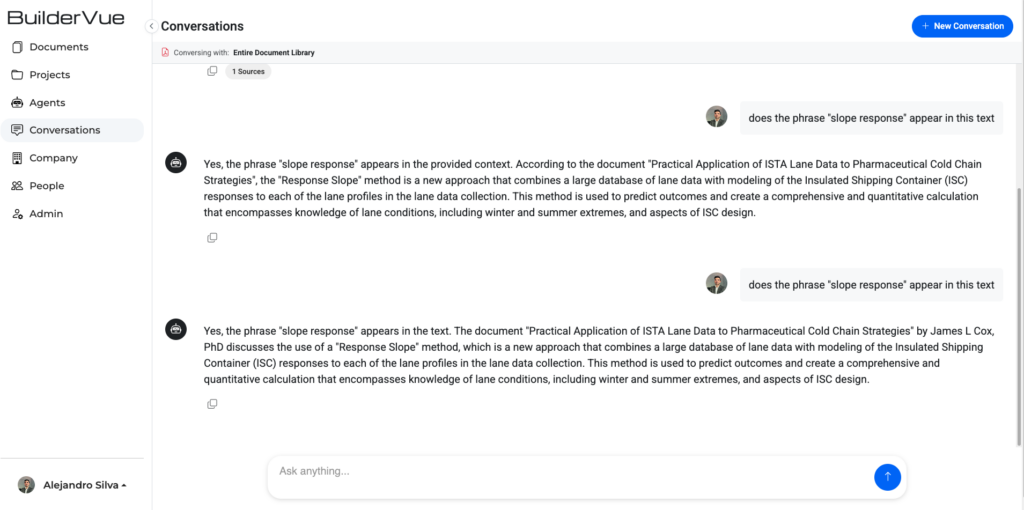
BuilderVue AI is an AI-powered document intelligence and project management platform for the construction and building industry. I built the entire client-side application, the interfaces that sit on top of the platform’s APIs and AI capabilities.

As the frontend developer, my scope was the whole client application: authentication, role-based navigation, the document and project modules, the real-time AI chat, and every shared UI pattern that ties them together. I did not work on the backend services or the AI models themselves. My focus was designing and building polished, reliable interfaces that consume them.
What I Built

  • Full authentication flow. Login, signup, email verification, account activation, and forgot/reset password, with JWT handling through HTTP interceptors and token refresh logic.
  • Role-based routing and access control. Route guards for site admin, company admin, and standard user, so navigation and features adapt to the signed-in role.
  • Project management module. Project listing, add/edit dialogs, and UI wired to the platform’s REST API through typed Angular services.
  • Document management module. A document list with server-driven filtering, upload/add and edit flows, advanced filter dialogs, and models for document source, visibility, and language.
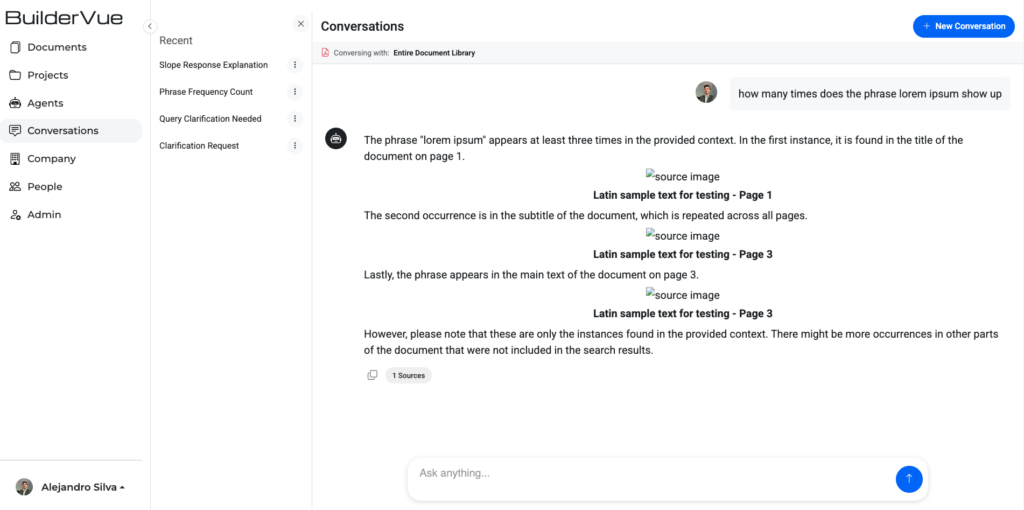
  • AI chat interface. A conversational UI for querying documents, with streaming, real-time message updates over SignalR and markdown rendering of AI responses.
  • AI agents page. Configuring and interacting with different assistant types.
  • Company and people management. Company profiles, team member administration, invitations, and company detail dialogs.
  • Subscriptions and billing UI. Plan selection, a pricing page, and payment profile management.
  • Admin dashboard. Platform-level administration surfaces.
  • Marketing surfaces. Landing page, about, pricing, contact-us, and a carousel.
  • Shared UI layer. Reusable confirmation and success dialogs, a global loading-indicator service, centralized error and notification handling, and a base HTTP service pattern that every feature service extends.
Tech Stack

  • Framework. Angular 21 with TypeScript and RxJS, using a standalone/module hybrid architecture.
  • UI &amp. Styling. Angular Material and Bootstrap 5, with SCSS for custom theming.
  • Real-time. SignalR and Socket.IO clients for live updates.
  • Libraries. ngx-translate for internationalization, ngx-toastr for notifications, ngx-pagination, ng-select, and marked for markdown rendering.
  • Tooling. Vitest for unit testing, with multi-environment build configs for dev, QA, and production.

Frontend Engineering Highlights

  • Component architecture and reusability. A standalone/module hybrid where shared dialogs, tables, and filter components compose across every feature module instead of being rebuilt per screen.
  • Service layer design. A base HTTP service pattern that all feature services extend, keeping API access typed, consistent, and easy to reason about.
  • Reactive state with RxJS. Data, real-time updates, and UI state modelled as streams for predictable, composable behavior.
  • Real-time UI. SignalR and Socket.IO clients pushing live updates into the interface, from streaming chat messages to notifications.
  • Responsive design. Angular Material, Bootstrap 5, and SCSS theming delivering a consistent experience across marketing pages and the application itself.
  • Polished UX on top of AI. Streaming responses, markdown rendering, toasts, and global loading states that make the AI features feel fast and trustworthy.

My Role

Frontend developer. I built the entire client-side application, the full authentication and access-control layer, every feature module, the real-time AI chat, and the shared component and service architecture underneath them. The backend services and the AI models were owned by others. My job was to turn those capabilities into a clean, responsive, production-ready interface.

Tingley Rubber, a leading manufacturer of protective workwear and rubber footwear, needed a stronger and more content-rich presence on their Shopify storefront. Working as part of the agency team, the focus was on growing the site’s depth and improving the experience for both customers and the internal team managing content day-to-day.

A significant portion of the work involved building out new pages across the site, from product-focused landing pages to informational content, each constructed using the Shopify CLI to develop custom sections. This approach gave the client’s team full flexibility to edit and update content directly through the Shopify backend without touching any code, making the site far more maintainable going forward.

The homepage received targeted improvements, including the integration of a new hero image module, giving the brand a more polished and visually compelling first impression. Alongside the site work, a series of HTML emails were developed to support ongoing marketing campaigns, built to render consistently across major email clients while staying aligned with Tingley’s brand standards.

A fully playable 2D platformer game developed from scratch using Python and the Pygame library. This project was built to deepen my understanding of game development principles while demonstrating core programming skills in a fun and interactive way.

The game features smooth player movement and physics, including jumping, gravity, and acceleration. Levels are designed with hand-crafted platforms and obstacles that challenge the player to time their movements carefully. A scrolling camera system keeps the player centered as they move through each stage, and a collision detection system handles interactions between the player, platforms, enemies, and collectibles.

On the technical side, the project is structured around a clean game loop with organized sprite groups and scene management. Sprite sheets were used to handle character animations, bringing the player and enemies to life with fluid movement cycles. Sound effects and background music were integrated using Pygame’s audio mixer to enhance the overall experience.

As part of an ongoing commitment to inclusive web experiences, our client at RNT.com underwent a comprehensive accessibility audit conducted by Level Access, a third-party accessibility evaluation platform. The audit identified a range of WCAG compliance issues across the site that required hands-on code-level remediation.

Working directly within the WordPress codebase built on Advanced Custom Fields (ACF) layouts, I reviewed each flagged issue and implemented targeted fixes to bring the site into alignment with accessibility best practices.

Remediation work included adding descriptive aria-label attributes to interactive elements that lacked meaningful context for screen reader users, as well as assigning appropriate ARIA roles to structural and UI components that were not being interpreted correctly by assistive technologies. Images throughout the site were audited for missing or inadequate alt text, with descriptive alternatives written and applied to convey the correct context and intent of each visual element. Additionally, decorative or redundant elements that had been inadvertently exposed to screen readers were corrected using aria-hidden=”true”, ensuring that assistive technologies only surface content that is meaningful and intentional to the user experience.

Several color contrast violations were also identified where foreground text colors did not meet the minimum contrast ratio requirements against their background colors. These issues were resolved by adjusting the color values within the stylesheet to ensure all text remained legible and compliant with WCAG AA standards. Font sizes across various components were also flagged as too small to meet accessibility thresholds and were updated to ensure readability for all users, including those with low vision.

This portfolio was built as a fully custom WordPress theme, developed locally and then exported to a production environment. The project reflects my approach to building scalable, performance-focused websites without relying on page builders or pre-made themes.

The site was developed primarily using PHP, HTML, and CSS, with a clean, structured theme architecture. Instead of modifying an existing framework, I created a custom theme to maintain full control over layout structure, performance optimization, and long-term maintainability.

To manage content efficiently, I implemented custom post types for projects. This allows each portfolio piece to be structured with consistent fields and formatting while remaining easy to update through the WordPress dashboard. The goal was to separate content from design, ensuring that new projects can be added without disrupting layout or styling.

On the front end, I integrated GSAP to create smooth, scroll-based animations and subtle motion effects that enhance the user experience without overwhelming it. These animations are performance-conscious and designed to guide attention rather than distract from content. Lottie animations were also incorporated to add lightweight, scalable vector-based motion elements that maintain visual polish without sacrificing load speed.

I build custom automation workflows using n8n to streamline repetitive tasks, reduce manual effort, and connect disconnected systems into efficient, reliable pipelines. These automations are designed to operate quietly in the background while improving operational speed and consistency.

My n8n workflows integrate platforms such as WordPress, email marketing tools, CRMs, form builders, Google Sheets, and external APIs. Rather than relying on one-size-fits-all automation templates, I structure each workflow around a specific business process and build logic that reflects real-world use cases.

Examples of automations I’ve built include:

  • Automatically capturing form submissions and pushing them into CRM systems
  • Syncing WordPress user or order data with email marketing platforms
  • Trigger-based notifications for new leads or purchases
  • Scheduled data exports and reporting workflows
  • API-to-API data transfers with filtering and conditional logic
  • Content publishing and update triggers across platforms

Each automation includes structured error handling, conditional branching, and data formatting to ensure reliability. I focus heavily on making workflows maintainable and easy to adjust, with clear naming conventions and modular design.

This project is a custom analytics dashboard designed to connect directly to a website’s Google Analytics account and transform raw performance data into a cleaner, more intuitive reporting experience. The goal is to simplify how site owners understand their traffic without forcing them to navigate complex GA menus or interpret overwhelming data tables.

The dashboard integrates with the Google Analytics API to securely pull key metrics such as users, sessions, bounce rate, average engagement time, traffic sources, device breakdown, geographic data, and conversion events. Instead of replicating the Google Analytics interface, the system restructures this information into a focused, visual-first layout built around clarity and decision-making.

The UI prioritizes:

  • Clear KPI cards for high-level performance snapshots
  • Interactive charts for traffic trends over time
  • Visual breakdowns of acquisition channels
  • Device and location insights in simplified formats
  • Conversion tracking displayed in goal-oriented views

Rather than presenting every available metric, the dashboard is structured to highlight what actually matters to business owners: growth trends, marketing effectiveness, and user behavior patterns.

I regularly build custom WordPress websites, focusing on clean design, clear messaging, and practical functionality that reflects the needs of the client, or, in this case, mock projects designed to simulate real-world small business scenarios.

As part of my portfolio, I created five different mock sites locally, each with unique branding and content goals, and then hosted them to showcase fully functional, end-to-end development. This process gave me hands-on experience with custom theme development, including structuring templates, building reusable components, and managing dynamic content through ACF layouts.

Working on these mock sites reinforced my existing experience with custom ACF layouts and helped me deepen my understanding of how themes are built from scratch, including:

  • Creating clean, organized template files for various page types
  • Structuring custom fields to make content management intuitive
  • Designing responsive layouts with practical UX for different devices
  • Implementing styling and scripts in a way that supports both flexibility and maintainability

For Hanwha Vision America, I led the redesign and redevelopment of the homepage with a focus on performance, flexibility, and long-term content control. The objective was to modernize the visual experience while giving the internal team a powerful but simple system to manage content without compromising design integrity.

The homepage was rebuilt using a modular layout system powered by Advanced Custom Fields (ACF). Instead of hardcoded sections or rigid templates, I created custom, reusable content blocks that allow the client to update headlines, imagery, CTAs, featured products, and promotional sections directly from the WordPress dashboard. Each section was structured with predefined layout rules and styling constraints to ensure visual consistency across the site.

The goal was to eliminate the need for the client to think about spacing, padding, typography, or alignment. All styling decisions were handled at the development level, so their workflow is focused entirely on content. They can add or rearrange sections, swap images, and update messaging without ever touching CSS or worrying about breaking the design.

Totem is an idea I had that I wanted to test out. The goal of the totem app is to connect people who go to large crowded events where there is often little to no cellular service, such as music festivals and concerts. Some of these places often have little to no WIFI or cellular service of any kind, and it makes to difficult to find your friends or family if you get separated.

The concept combines a small wearable tracker with a mobile app, allowing users to create private groups and locate one another in real time without relying on traditional cellular infrastructure, using UWB technology.

Each user would purchase a Totem tracker that syncs directly with the app. Once connected, friends can form a group before entering an event. When inside the venue, Totem would use alternative communication technology, such as mesh networking or radio-based signals, to maintain device-to-device connectivity, enabling location sharing even when there’s zero signal.

The app uses Supabase as its backend, handling the database and server side logic through PostgreSQL under the hood. User authentication is managed through OAuth 2.0 with Google, giving users a seamless and secure way to sign in. Data communication between the app and the backend is handled through the Supabase client SDK, keeping everything connected in real time.

This project represents my interest in building solutions that extend beyond the browser and into physical environments, combining thoughtful UX with technical experimentation to solve real social coordination challenges.